Every valid COA is lab-certified and cryptographically signed.
The verify page checks two things before it shows a valid state: the performing lab certified the submitted result data, and Purity Analytics sealed the final COA with a Sectigo Document Signing certificate. The PDF names the performing lab and carries research-use-only limitations. The signature is embedded directly in the PDF and timestamped by an RFC 3161 authority, so any change to the document breaks the seal.
This section shows you what a valid COA looks like on the verify website and in Adobe Acrobat Reader, what an invalid (tampered) one looks like, and what's happening under the hood so you can verify everything yourself without taking our word for it.

Valid example
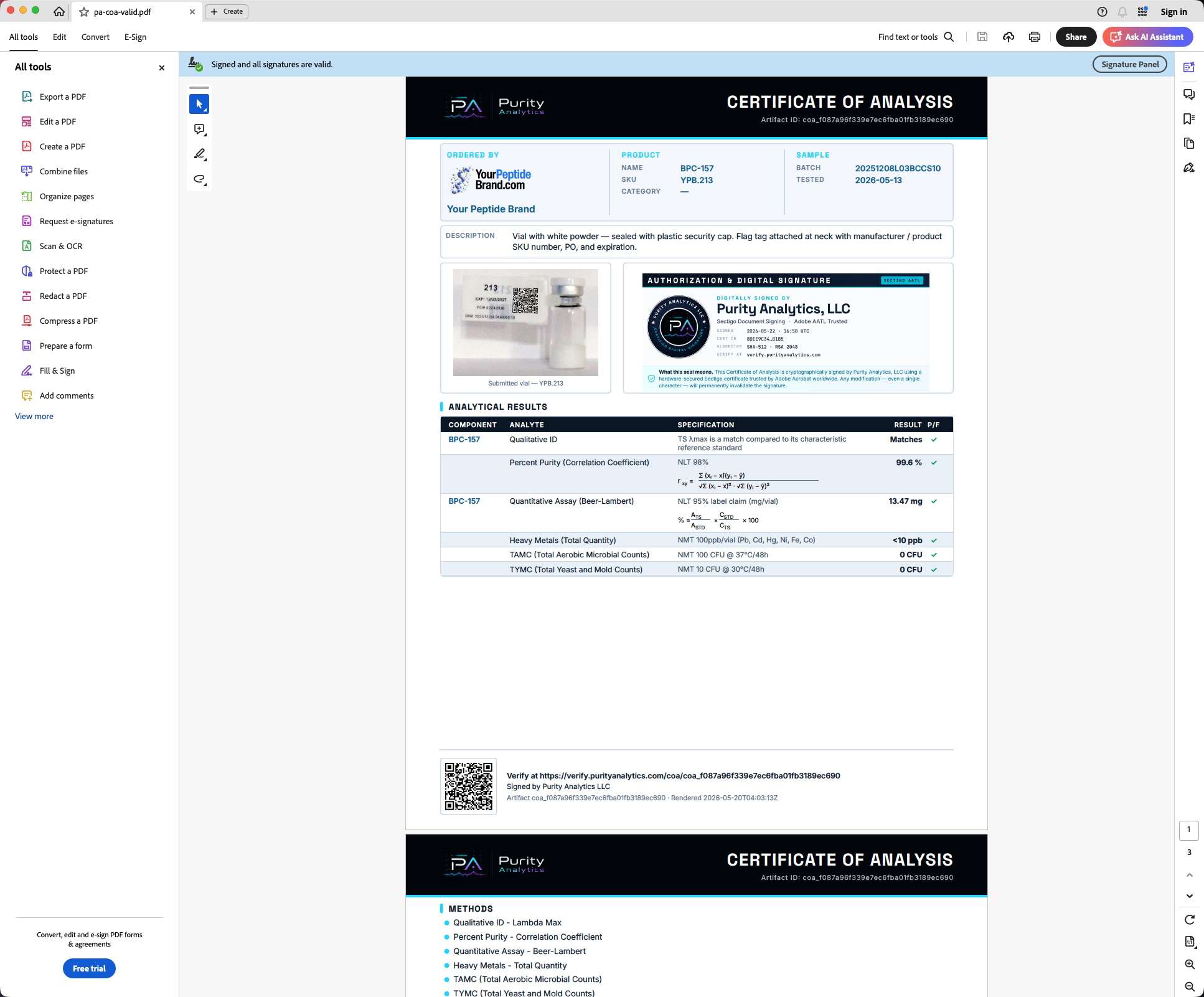
A real performing-lab-certified, signed COA on the verify website with green validation checks, plus the same file opened in Adobe Reader showing the blue "Signed and all signatures are valid" banner.
View walkthrough →Invalid example
A tampered copy of the same COA. The verify website flips to "Document modified" — and Adobe Reader shows a red "At least one signature is invalid" banner. Side-by-side screenshots.
View walkthrough →How it works
The full chain of trust: PKCS#7 signature embedded in the PDF, Sectigo Document Signing certificate, AATL root bundle, RFC 3161 timestamp authority, and the per-request Tier-1 hash binding the verify website runs live.
Read the deep-dive →Why don't I see the signature when I open the PDF in my browser?
Browser PDF viewers — Chrome's built-in PDFium, Safari Quick Look, and Firefox's PDF.js — parse the document but do not validate embedded digital signatures. They show the content correctly and silently skip the cryptographic checks. This isn't a flaw; document-signature trust is the Adobe ecosystem (ISO 32000-2, AATL), not the web platform.
To actually see and verify the signature, download the COA PDF and open it in Adobe Acrobat Reader (free at get.adobe.com/reader), Adobe Acrobat Pro, or any PDF tool with PKCS#7 support. The valid example walkthrough shows exactly what to look for once it's open.
Try it on a real COA right now
The fastest way to understand what's happening is to scan the QR code on any Purity Analytics report — or click through to the live verify website and pull up one of the production COAs. A COA is valid only after lab certification and Purity Analytics signing are both complete.
Research-use-only, no reliance, and liability limits.
These pages are research-use-only analytical education. They are not medical, safety, legal, regulatory, quality-system, purchasing, or product-use advice, and they do not state that any material is safe, effective, sterile, injectable, therapeutic, approved, compliant, or fit for human, animal, clinical, therapeutic, diagnostic, drug, dietary, cosmetic, resale, or other regulated use.
- Official standards, signed lab records, applicable law, and qualified professional review control.
- Visitors use and rely on this content at their own risk.
- To the fullest extent permitted by law, Purity Analytics LLC and its laboratories, partners, vendors, affiliates, contractors, service providers, customers, and agents disclaim warranties and liability for losses arising from access, use, or reliance.